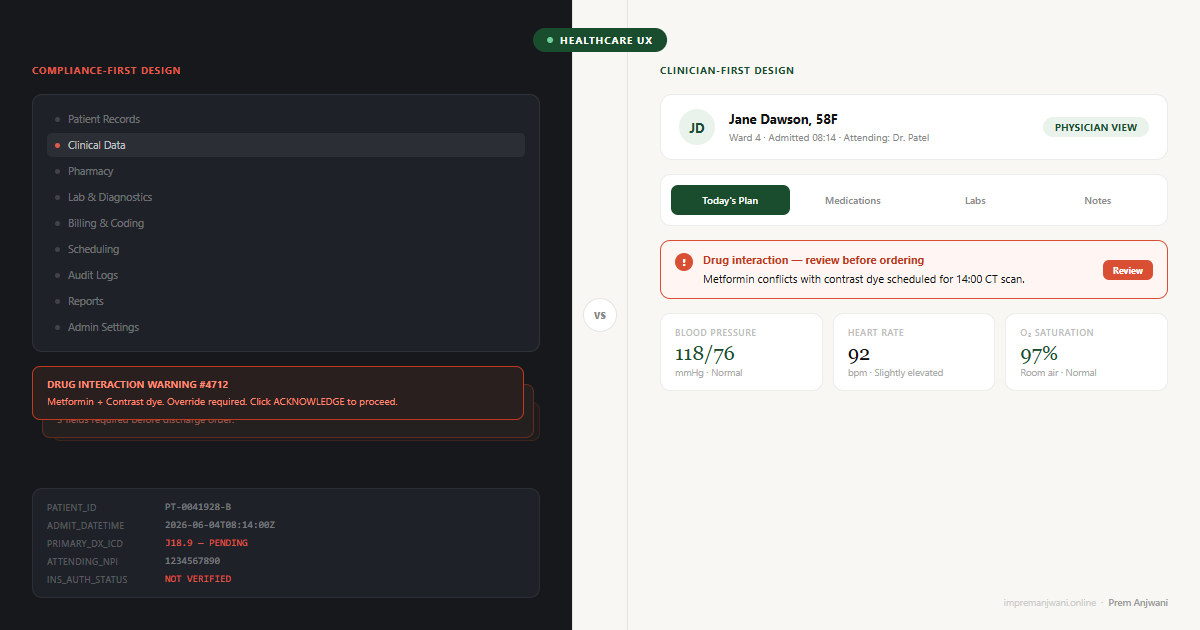
The software clinicians use every day scores 45.9 out of 100 on usability - placing it in the bottom 9% of all industries. Doctors spend more than 16 minutes per patient navigating the EHR, yet most appointments are 15 minutes long. The software now takes longer than the patient. This is not a technology problem. It is a design priority problem.
As a UI/UX designer who has worked on Optiwell - a multi-role EMR platform serving clinicians, administrators, and billing staff - I have seen this pattern up close. The system had been built around what the database needed to store, not what the physician needed to see before entering an exam room.
Designed for Compliance, Not Clinicians
EMR systems were not built around the clinician's day. They were built around the billing cycle, the audit trail, and the regulatory requirement.
The result is software that captures everything a healthcare system needs to prove what happened - and makes it nearly impossible for the person caring for the patient to find what they need in the moment. Notes are structured for legal defensibility. Alerts fire for liability protection. Menus are organised around data categories, not clinical decisions.
This is not an accident. Healthcare software vendors face extraordinary regulatory pressure. HIPAA compliance and hospital procurement requirements pull design toward documentation and away from usability. When the person writing the requirements is a compliance officer and the evaluator is a procurement manager, the clinician's daily experience rarely wins.
The consequence is a product that 96% of US hospitals use - and that nearly half of physicians say actively hinders their work.
Why Bad EMR UX Is a Patient Safety Issue, Not Just a Frustration
Most usability problems are annoying. In healthcare, they become dangerous.
Clinicians working through confusing interfaces make more errors. A documented case involved a delayed emergency blood transfusion because the interface required an Apgar Score before the ordering screen would unlock - data the clinician could not locate in time. That is not a workflow inconvenience. That is a design decision with a direct clinical consequence.
Unfamiliar layouts lead to misclicks on dosages. Alert fatigue - caused by too many low-priority pop-ups - causes clinicians to dismiss warnings they should act on. Data re-entry errors occur because information that already exists elsewhere in the system cannot be surfaced where it is needed. Research published in peer-reviewed journals consistently links poor EMR usability to adverse clinical events.
Bad EMR UX also contributes to physician burnout. The average provider spends two to three hours a day on documentation alone. That is time not spent with patients, compounding into frustration, fatigue, and attrition. A usability problem at the screen level becomes a workforce problem at the organisation level.
Four Patterns That Make Clinical Software Unbearable
These appear in almost every EMR system in some form. They appeared prominently in the Optiwell work, and fixing them is what changed how each role experienced the platform.
1. Data-model navigation
The menu structure mirrors the database architecture, not how a clinician thinks. A nurse looking for a patient's current medications should not have to navigate through four category levels built around data tables. Their mental model is: patient - encounter - what I need now. The navigation says: records - clinical - pharmacy - active medications - filter by date. The gap between those two structures is where time and patience disappear.
2. Alert overload
Clinical decision support alerts are valuable in principle. In practice, most systems fire so many low-priority warnings that clinicians learn to dismiss everything - including the ones that matter. The fix is not fewer alerts. It is better signal design: clear severity levels, strong visual hierarchy, and suppression rules for known benign patterns that experienced clinicians do not need flagged every time.
3. No role differentiation
A surgeon, a ward nurse, and a hospital administrator have completely different relationships with patient data. Most EMRs give all three the same interface and expect each to navigate information that is largely irrelevant to them. This is the same failure that shows up in SaaS dashboard design - when everyone gets everything, no one finds what they need quickly. Role differentiation is not a permissions problem. It is an experience design problem.
4. Documentation as the primary workflow
EMRs are built to record what happened - not to help the clinician decide what to do next. The interface is backward-facing by default. Good clinical UX inverts this: it surfaces what the clinician needs for the current decision, and documentation happens as a byproduct of the workflow rather than as a separate task performed after it.
Cognitive Load Theory, developed by educational psychologist John Sweller, distinguishes between intrinsic cognitive load (the complexity inherent to the task itself), extraneous cognitive load (the load added by poor design), and germane load (the load that produces meaningful understanding). Clinical work carries high intrinsic cognitive load by definition. A physician diagnosing an acute presentation is doing genuinely demanding cognitive work that cannot be reduced. What EMR systems consistently add on top of that is extraneous cognitive load: irrelevant navigation menus, alerts that fire regardless of urgency, documentation structures that do not match the clinical encounter sequence. The physician is doing the hard clinical thinking and simultaneously fighting the software's organizational logic. Good clinical UX has one job in this context: eliminate extraneous load entirely. Every piece of information on screen that is not relevant to the current clinical decision is adding friction the clinician cannot afford. The interface should subtract from cognitive demand, not contribute to it.