What This Looks Like in Practice
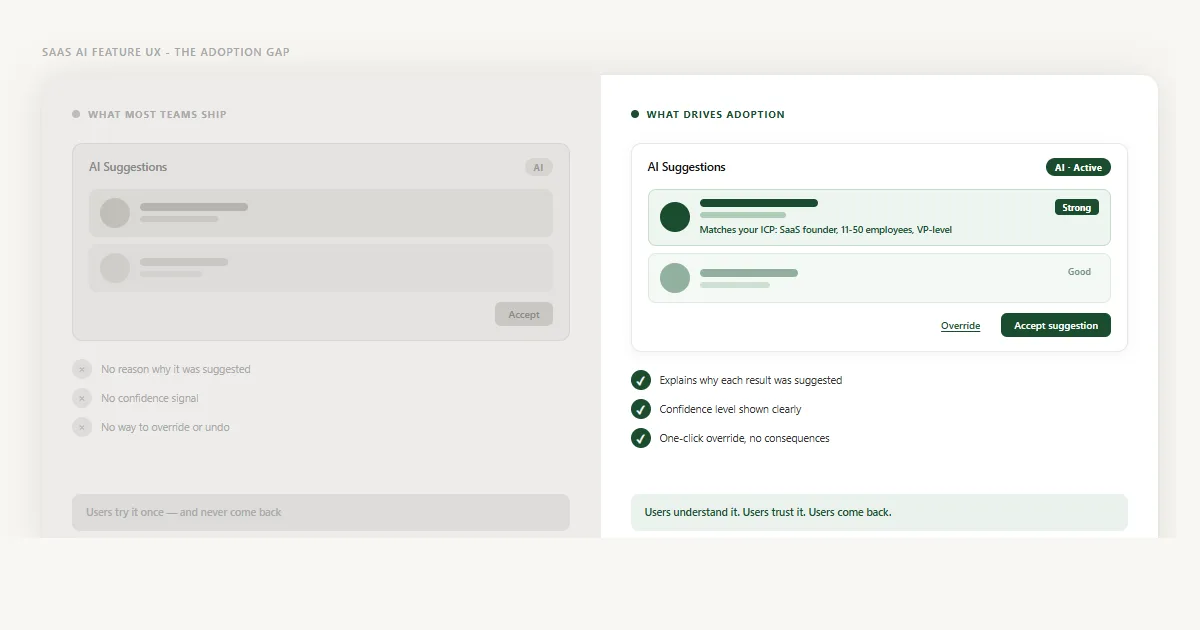
When I worked on the dashboard redesign for Linkyfy.ai - an AI-powered LinkedIn prospecting platform - AI adoption was the core problem. The platform's AI had been generating prospect suggestions for months. Usage data showed that fewer than one in five users ever acted on them.
The suggestions weren't wrong. But every card looked identical: a name, a role, and an Accept button. No reason why. No confidence signal. No way to dismiss without it feeling like a permanent decision. Users described the feature as "random" and "hard to trust" - not because they'd tested it and found it lacking, but because they had no basis on which to evaluate it at all.
The redesign made three targeted changes. First, each suggestion card gained a one-sentence match reason: "Matches your ICP: SaaS founder, 11–50 employees, VP-level." Second, suggestions were labelled with confidence tiers - Strong, Good, or Worth reviewing - each with distinct visual weight. Third, the Accept button gained an inline Override option that required no confirmation dialog. Users could disagree with the AI without any friction or consequence.
The AI model didn't change. The data didn't change. What changed was that users could now read what they were being shown, calibrate how much to trust it, and step back without penalty. Engagement with the suggestion feature shifted noticeably within the first few weeks as users began treating the AI as a collaborator rather than a black box.
This pattern shows up across every AI feature I've reviewed - including alert triage workflows in health analytics tools, where the stakes of a wrong AI suggestion are high and the need for legible reasoning is even greater. The same gap that kills SaaS onboarding also kills AI adoption - users encountering a system they can't read, with no clear signal of what to do next and no safe way to step back. Transparency fixes both.
When the AI Gets It Wrong
The three failure modes above all describe what happens before the user acts. There's a fourth failure that happens after: the AI makes a bad suggestion, the user acts on it, and the recovery experience determines whether they ever engage with the feature again.
Most product teams optimise for accuracy (reducing bad suggestions). Fewer teams design for error recovery (what users do when a bad suggestion gets through). This is where lasting trust damage happens.
Three things matter in AI error recovery. First, acknowledgement: don't hide that something went wrong. If a user identifies a bad suggestion, the product should make it easy to flag it - and should treat that flag as a learning signal, not a complaint. Second, undo vs correction: these are different actions with different implications. Undo restores the previous state. Correction teaches the model. Notion AI separates these clearly: "Undo" reverses the output; "Try again" signals dissatisfaction and regenerates. Both options are visible. Neither feels punitive. Third, framing override as feedback: the interface should communicate that disagreeing with the AI is a normal, useful part of using it. "Not a match" or "Teach me your preferences" is a better label than "Dismiss." It reframes the interaction from rejection to collaboration.
When error recovery is well-designed, something counterintuitive happens: users trust the AI more after it gets something wrong, because they've seen that the system handles disagreement gracefully. The AI earns trust not by being perfect but by being honest and correctable.
Trust Builds Across Interactions, Not in One Moment
The design decisions above - reasoning, confidence, override, error recovery - all address individual moments. But AI adoption is not won or lost in a single interaction. Trust in an AI feature builds across a series of exposures over time, and the UX requirements change at each stage.
First session: Users need to understand what the AI does and doesn't do before they trust any output from it. An explicit introduction - one or two sentences explaining the data the AI uses and the type of suggestions it makes - sets accurate expectations. This is not an onboarding tour. It's a single contextual sentence near the first suggestion, positioned where the user's attention already is. The same principle that prevents SaaS onboarding failure applies here: users who understand what they're being shown are far more likely to engage with it.
Early use (first two to four weeks): Higher transparency is required. Show reasoning on every suggestion. Label every confidence tier. Make the override prominent. Users are still calibrating whether the AI is worth trusting - each interaction is a test. Reduce the explanatory density only after users have built a baseline of trust through repeated positive experiences.
Habitual use: Users who have adopted the feature know what to expect. You can reduce friction here: lighter confidence labels, shorter reasoning sentences, fewer prompts to override. The UX should adapt as the relationship matures. Heavy-handed explanations become noise for a user who already trusts the system.
Breakdown recovery: The first time a trusted AI feature makes a significant error is the highest-risk moment in the adoption arc. If the error is recoverable and handled gracefully, trust survives. If it feels unrecoverable - the user can't undo it, can't understand why it happened, can't prevent it from happening again - trust collapses and rarely returns. Build your error recovery UX before you need it.
Not All AI Features Need the Same UX
The principles above apply universally. The execution differs significantly depending on what type of AI feature you're building and what's at stake for the user.
Suggestion AI (CRM, sales, prospecting): Users are choosing between acting on a suggestion or doing the task manually. The primary design requirement is scannable confidence - a list of suggestions where high-confidence items are visually distinct from low-confidence ones so users can batch their attention. Linkyfy.ai's prospect scoring falls into this category. The goal is speed: users should be able to process a full suggestion queue without reading every card carefully.
Alert and monitoring AI (analytics, health, operations): Users need to triage, not just accept or reject. The primary requirement is explainable reasoning - enough context to decide whether an alert requires immediate action, can wait, or is a false positive. In health analytics tools like Optiwell, where AI surfaces clinical and operational alerts, the consequences of dismissing a real alert are high. The UX must support deliberate review, not fast action. Confidence levels still matter, but the interaction mode shifts from quick-accept to informed-triage.
Generative AI (content drafting, summaries, replies): Users are editing AI output rather than accepting or rejecting discrete suggestions. The primary requirement is editable output with visible constraints - what data or inputs the AI used, what it was optimised for, and how to regenerate with different parameters. GitHub Copilot and email-drafting tools in HubSpot sit in this category. The override is a rewrite, not a dismiss. Trust is built by making the generation process legible, not just the output.
A fourth category worth noting: AI-powered search within SaaS products has its own trust requirements - users expect search to be neutral, so any AI reranking or filtering must be declared, not hidden. The same transparency principle applies, but the user mental model is different.
How to Know If Your AI Feature Has a Trust Problem
Three signals worth tracking: (1) High first-use rate but low return rate - users explore once and don't come back. (2) Override rate near zero - users aren't disagreeing with the AI, which could mean they trust it completely, or that overriding feels too risky to attempt. Distinguish these by talking to users. (3) User research feedback containing the words "random," "hard to trust," or "I just ignore it" - these phrases indicate a transparency gap, not an accuracy gap.